Free vs Paid Email Signature Generators: What to Pay For
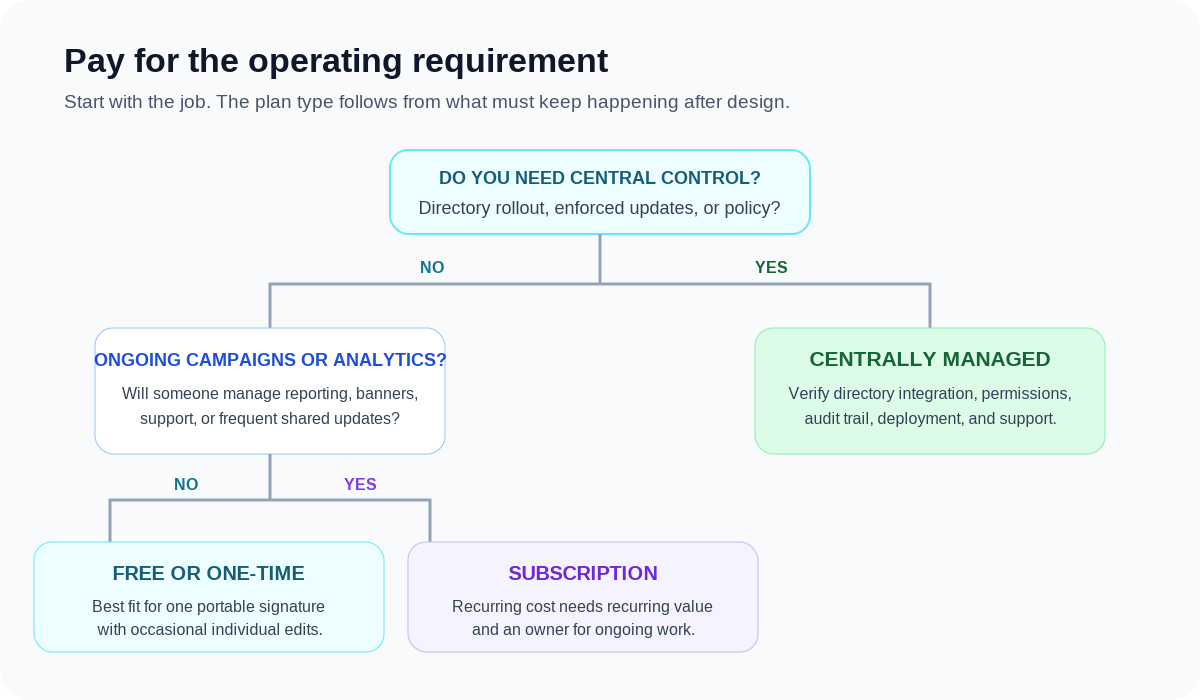
The short answer: a free builder is enough to explore layouts and may be enough for a simple export. Pay once when you need a polished reusable signature without ongoing team controls. Choose a subscription or enterprise platform only when recurring value—central deployment, governance, analytics, support, or frequent campaigns—matches the recurring cost.
Commercial disclosure: Email Signature Generator sells a US$9 one-time Pro unlock. This guide states that offer plainly and includes situations where a subscription or centrally managed platform is the better fit.
Start with the job, not the price
| Model | Best fit | What to verify before choosing |
|---|---|---|
| Free | One simple signature or layout exploration | Can you export it, is branding added, where are images hosted, and is an account required? |
| One-time payment | Individuals who need repeat creation without monthly administration | What is unlocked, how access is restored, and whether image hosting or saved edits are included |
| Subscription | People or small teams using ongoing campaigns, analytics, support, or frequent updates | Per-user limits, renewal price, export rights, data retention, and cancellation behavior |
| Centrally managed | IT-led organisations that must control signatures across accounts | Directory integration, deployment method, permissions, audit trail, regional rules, and rollout support |
What “free” can mean
Free is not one consistent product category. A tool may let you design and preview without charge but require payment to copy the finished signature. Another may export a basic template but reserve unbranded layouts, hosted images, saved edits, or team features for a paid plan.
Before entering personal or company details, check:
- whether the finished signature can actually be copied or downloaded;
- whether the export includes a promotional footer or watermark;
- whether photos and logos use stable public URLs;
- whether the service stores your details or requires an account;
- whether you can return later and edit the same signature;
- whether links contain tracking or redirect through the provider.
What is worth paying for
Reliable export and image hosting
A design preview has little value if the final HTML cannot be copied into the email client or its images point to temporary, private, or local files. Paid hosting can be useful when you do not control a stable public website or CDN.
Saved edits and repeat use
Saved signatures matter when roles, phone numbers, campaign links, or team details change. Verify how the edit link or account is secured, how long data is retained, and whether paid access can be recovered on another browser or device.
Central control
Once IT must enforce a company layout, update every employee, apply region-specific disclaimers, or prevent local edits, the problem is no longer just design. A centrally managed platform may justify recurring cost because it replaces manual coordination and individual installation.
Analytics and campaigns
Tracking and rotating banners create ongoing operational work as well as data and privacy questions. Pay for those features only when someone will own the campaign, interpret the results, and keep destinations current.
How this product’s plan actually works
In the current product, all 28 templates and the live preview are available without an account. The US$9 one-time Pro purchase unlocks HTML and plain-text copy, hosted photo and logo uploads, saved edit links, and animated elements. Those facts come from the current product configuration and visible pricing section; they describe this product, not the wider market.
The trade-offs are equally important: this is a self-service tool. It does not provide central directory deployment, organisation-wide policy control, per-user administration, or campaign analytics. If those are required, choose a managed team platform.
Decision guide by situation
| Situation | Practical choice | Reason |
|---|---|---|
| Testing layouts before deciding | Free builder | Do not pay before confirming the fields and layout suit your message context. |
| One professional signature with occasional edits | Free export or one-time tool | A recurring plan needs recurring value to justify it. |
| Frequent banners, click reporting, or campaign changes | Subscription | Ongoing features and support may match ongoing work. |
| Small team where each person installs their own signature | One-time or simple subscription | Compare the cost of coordination with the value of shared assets and saved edits. |
| Company-wide enforcement or directory-driven updates | Centrally managed platform | Individual copy-and-paste does not solve governance. |
Use a received-message test before buying more features
Build the simplest candidate, install it, and send test messages to the clients that matter. Check the received signature on desktop and mobile, with images available and unavailable, and in a reply. The email signature health check can inspect existing HTML before installation, and the best-practices checklist explains what to test.
If a basic tool passes and the team can maintain it, extra features may add no value. If the signature fails because images are unstable, details cannot be updated, or staff cannot be coordinated, you have identified the specific capability worth paying for.
Preview all 28 templates before deciding
Build and preview without an account. If the result fits your needs, Pro is US$9 once for copy, hosted images, saved edits, and animated elements.
Build Your Signature